
Nudge Comes to iPad
Nudge is now on iPad, with a sidebar for your rooms, drag-to-play, full-screen Now Playing and ambient mode. The iPhone app gets landscape Now Playing, StandBy and more.
Beautiful Sonos control for your iPhone, iPad and Apple Watch — now on the App Store.
Browse, pick a room and control what’s playing, all on one screen. Prop it on the counter and the album art takes over.
New in Nudge 26.10.1. Requires iPadOS 26.1 or later. Included with your subscription.

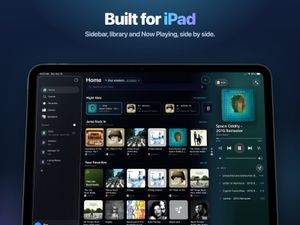
Nudge for iPad is a Sonos controller laid out for the big screen. Your rooms live in a sidebar, your music in the middle, and Now Playing stays in view on the right. Drag a song onto any room to play it there. It works alongside the Sonos app and never changes your speakers, groups, or settings.
One screen
Sidebar, Home and Now Playing side by side. Dig through your music on the left while the song you’re hearing stays in view.
Every room has its own page, so checking on the kitchen takes one tap.

Drag & drop
Pick up a song, album or station, drop it on a room in the sidebar, and it starts playing there.
Changed your mind? Tap Undo and the room goes back to what it was playing.

Across the room
Big album art and controls you can read from across the room. Pull up the queue right there and tap any track to jump to it.
Leave it for a moment and ambient mode fades the controls away.

Your way
Portrait or landscape, sidebar open or closed. With a Magic Keyboard you can play, skip and change volume from shortcuts.

Sonos already makes an iPad app, and you need it. Nudge is not a replacement for it — the two do different jobs, and they run side by side.
Nudge never changes your speakers, groups or settings. Install it, sign in, and everything you already set up in the Sonos app stays exactly as it is.
Any song, on any service connected to your Sonos, in one search.
Every room in the sidebar. Group and switch instantly.
Reorder, clear, and jump to any track from Now Playing.
Friends request, you approve. Free for everyone in your home.
Play, skip and change volume from a Magic Keyboard.
Laid out for the big screen — never a stretched-out iPhone app.
An iPhone or iPad on iOS or iPadOS 26.1 or later. Apple Watch features require an Apple Watch Series 6 or later on watchOS 11.6 or later. The iPhone and iPad apps handle speaker discovery and talk to your Sonos system in the background — no setup fuss.
Every S1- and S2-compatible Sonos speaker — from Play:1 and One to Era, Beam, Arc, Move, and Amp. If it’s on your Sonos system, Nudge can control it.
Over your local Wi-Fi for real-time control, plus the Sonos Cloud API to sync your Favorites and playlists (a one-time Sonos sign-in). A lightweight background service keeps your iPhone, iPad and Apple Watch in sync.
Yes. Nudge works right alongside the Sonos app and never changes your setup — your speakers, groups, and settings stay exactly as they are.
Yes. Nudge is local-first — your music, listening habits, and speaker names never leave your home, and are never sold or shared. We use anonymized usage analytics (Amplitude) and crash reports (Sentry) only to measure aggregate usage and diagnose problems, never tied to your music or Sonos account.
Yes. Nudge supports Apple Family Sharing, so one subscription covers your whole family group — at no extra cost.
There’s a free trial, then a choice of an annual or one-time plan. See pricing.
Yes. Nudge has an iPad app laid out for the larger screen, with a sidebar, Home and a Now Playing column side by side. It needs iPadOS 26.1 or later.
Yes — iPhone, iPad and Apple Watch are one app and one purchase. Download Nudge on your iPad, sign in, and your speakers are there.
Drag a song, album or station onto a room in the sidebar and it starts playing there. Tap Undo if you change your mind.
When full-screen Now Playing is left alone for a moment, the controls fade and the album art fills the screen. Touch the screen to bring the controls back.
Yes. With a Magic Keyboard, shortcuts handle play, skip and volume.
Yes, for setup, Trueplay, EQ and firmware. Nudge is a controller that runs alongside it and never changes your speakers, groups or settings.
Nudge is now on iPad, with a sidebar for your rooms, drag-to-play, full-screen Now Playing and ambient mode. The iPhone app gets landscape Now Playing, StandBy and more.